Overview
GPT (GIS Provisioning Tool) is a GIS automated data acquisition product.
The main objective of GPT is to reduce the effort required to provision drawings into a GIS system.
In addition, GPT gives users the option to filter data from the drawing and enhance the output result by adding more information in the form of new attributes.
GPT automatically imports layer data into GIS databases. The sources of the layer data can be either:
AutoCAD
Excel
The result of the GPT processing is new or modified layers of data in the GIS database.
Note
GPT does not import basemaps, such as tiled images, to GIS systems.
GPT initially supports Esri GIS servers, but can be extended to support additional GIS systems such as QGIS, Google Earth, and others.
Originally, GPT was a command line tool with configuration files. Since version 2.0, it has a web interface whose purpose is to make the user experience simpler.
GPT v3.0 is a web-based system with a server side and a client side. The client side is simply a browser. The server can be installed on-premises, although a cloud solution is possible as well.
The diagram below gives a general view of the data flow, from the input files up to the consuming applications.
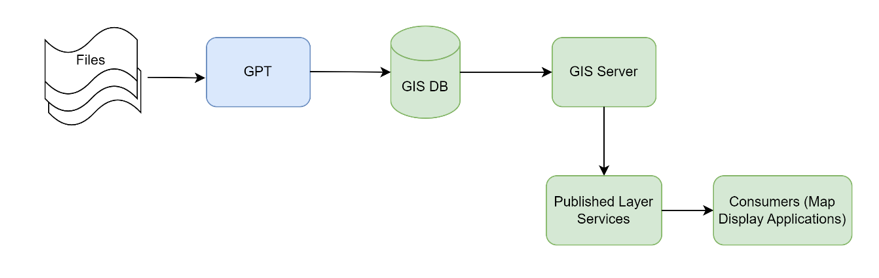
GPT Data Flow
Run GPT Application
In order to use GPT, a few .bat files must be launched to make sure GPT’s
services are up and running, together with its UI.
From the GPT server, the first thing to do is to run the GPT services. They are
divided into three .bat files, located at the following path:
C:\Axioma\batch\services
Right-click each .bat file, one at a time, and run it as administrator.
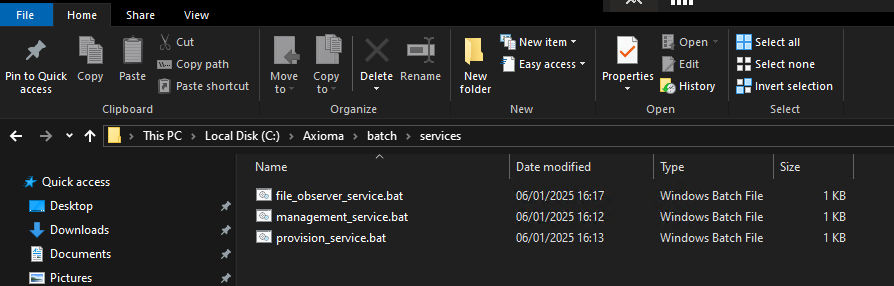
GPT services .bat files
Lastly, the GPT UI must be started via the dedicated start_ui.bat file,
located in the root batch folder.
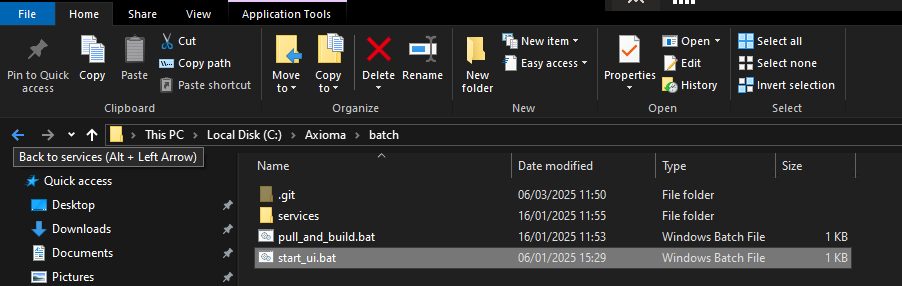
GPT UI .bat file